WebGL Planet Shader
An educational project implementing a 3D planet scene with custom vertex and fragment shaders, procedural noise, and texturing.
More About the Project
JavaScript | WebGL | GLSL
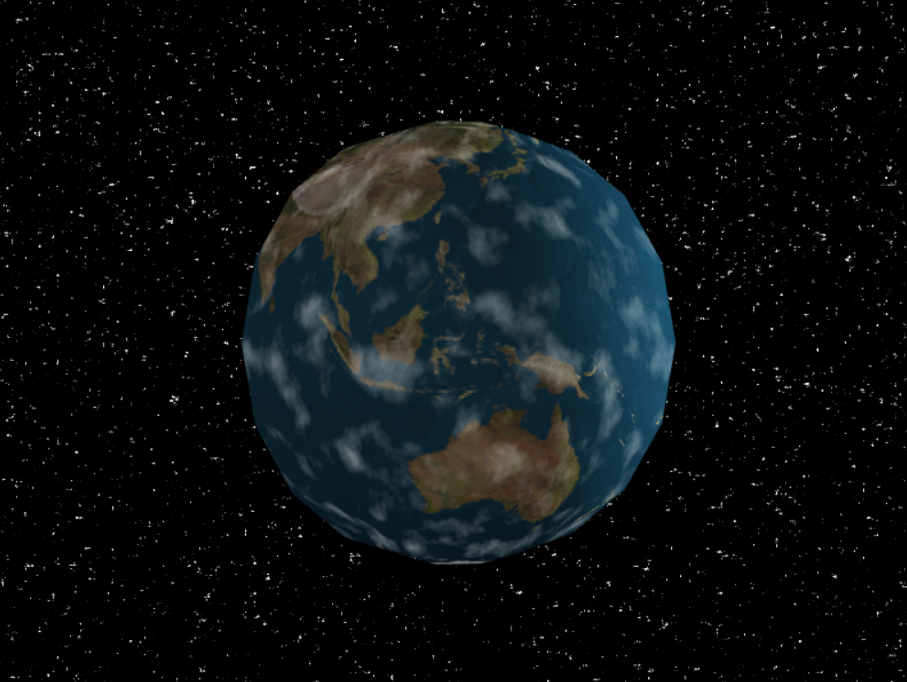
As part of the 'Graphics and Game Technology' course, this project involved using a JavaScript and WebGL framework to build a 3D scene from scratch. Starting with a blank framework, I implemented the procedural generation of a sphere mesh. I then wrote a series of GLSL vertex and fragment shaders to implement per-pixel Phong lighting, earth-map texturing, and procedural multi-layer noise for a dynamic cloud effect. Finally, I added a separate shader program to render an animated procedural starfield in the background.
My Contributions
Geometry and Lighting
Procedurally generated a 3D sphere mesh, calculating all vertex positions, normals, and texture coordinates.
Implemented Gouraud (per-vertex) shading and refactored it into a per-pixel Phong lighting model in the fragment shader.
Procedural Texturing and Effects
Applied a 2D texture map of the Earth to the sphere using a sampler in the fragment shader.
Wrote a GLSL noise function to generate multi-layered, procedural clouds that move over the planet’s surface.
Background Shader
Created a separate shader program to render a full-screen plane behind the planet.
Used a noise function in the background shader to generate and animate a procedural starfield.
Noise function
float noise (in vec2 st) {
    vec2 i = floor(st);
    vec2 f = fract(st);
    // Four corners in 2D of a tile
    float a = random(i);
    float b = random(i + vec2(1.0, 0.0));
    float c = random(i + vec2(0.0, 1.0));
    float d = random(i + vec2(1.0, 1.0));
    // Smooth Interpolation
    vec2 u = smoothstep(0.,1.,f);
    // Mix 4 corner percentages
    return mix(a, b, u.x) + (c - a)* u.y * (1.0 - u.x) + (d - b) * u.x * u.y;
}
Star Fragment Shader
void main(void) {
    vec3 finalLightColor = vec3(0.0);
    float starSpeed = 0.0005;
    float currentCount = mod(uFrame * starSpeed, 60.0);

    float xPos = vPos[0] + currentCount;

    if (noise(vec2(xPos * 200.0, vPos[1] * 200.0)) > 0.93) {
        float noiseColor = noise(vec2(vPos[0] * 50.0, vPos[1] * 50.0));
        finalLightColor += vec3(noiseColor);
    }

    vec3 color = finalLightColor;

    gl_FragColor = vec4(color, 1.0);
}