Vanilla Minecraft Custom HUD Shader
A shader-based technique to render a custom, non-vanilla HUD in Minecraft by manipulating the font rendering pipeline.
More About the Project
GLSL | Minecraft Shaders | Resource Packs
This project achieved a custom HUD display in vanilla Minecraft, a feature normally impossible without mods. The method uses the game's custom font system to store HUD images as bitmap 'characters'. By modifying the core vertex shaders (GLSL), the system detects when these specific characters are drawn (using a unique Y-offset) and intercepts the call. The shader then redraws the bitmap at a pixel-perfect, fixed position on the screen, creating a custom UI layer from what the game thinks is just text.
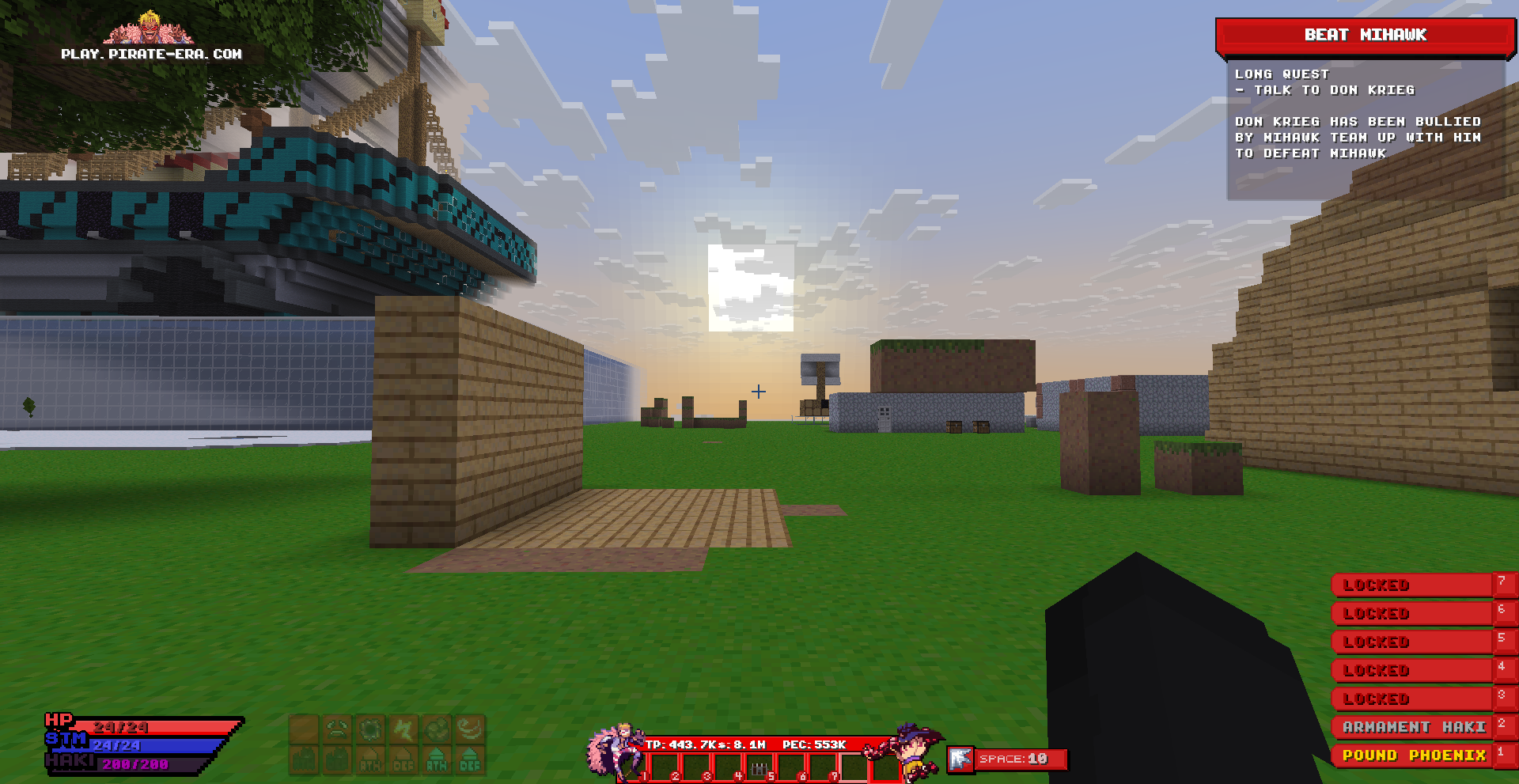
My Contributions
Shader Modification
Modified Minecraft’s core vertex shaders (GLSL) to intercept specific rendering calls based on their screen position.
Font-as-HUD Technique
Leveraged the custom font system by treating HUD images as bitmap characters, which are then ‘drawn’ with a unique Y-offset.
Pixel-Perfect Rendering
Wrote shader logic to detect this unique Y-offset, cancel the original font draw, and re-render the bitmap at a precise, fixed position on the screen.
getHudPos
vec3 getHudPos(vec3 pos, bool peoffset){
    int guiScale = getGuiScale();
    vec2 guiSize = getGuiSize(guiScale);
    vec2 anchor = guiSize / 2;

    float scaleFactor = float(TARGET_SCALE) / guiScale;
    vec2 aspectFactor = ScreenSize / TARGET_RESOLUTION;

    if(peoffset){
        pos.y -= PE_OFFSET;
    }
    pos.xy += getGuiOffset(guiScale);
    pos.xy = ((pos.xy - anchor) * scaleFactor) * aspectFactor + anchor;
    pos.y -= (((anchor.y * aspectFactor.y) - anchor.y) * scaleFactor);

    return pos;
}
Helper Functions
// The size of one pixel in the gui (not screen)
vec2 getGuiPixel(mat4 ProjMat) {
	return vec2(ProjMat[0][0], ProjMat[1][1]) / 2.0;
}

// The scale of your gui (client based)
int getGuiScale() {
    return int(floor(ScreenSize.x * ProjMat[0][0] / 2));
}

// The size of the screen at a certain guiscale
vec2 getGuiSize(int guiScale){
    return ceil(ScreenSize / guiScale);
}

vec2 getGuiOffset(int guiScale){
    vec2 offset = vec2(0.0);
    if(guiScale == 1) offset = vec2(0, -247);
    else if(guiScale == 3) offset = vec2(0.0, 82);
    else if(guiScale == 4) offset = vec2(0, 124);
    return offset;
}